.png?width=140&height=37&name=BLAZE-Logo-Blue%20(2).png)
Learn how to set up your Apple ID, iPad settings, and download the RSuite POS application.
All iPads are required to be logged in with an Apple ID. Whereas it might be tempting to log into your personal account, we highly suggest setting up a business Apple ID. Follow the on-screen prompts to set up your account or to log into an existing one.
Recommended iPad versions include 8th generation or higher.
iPad Settings
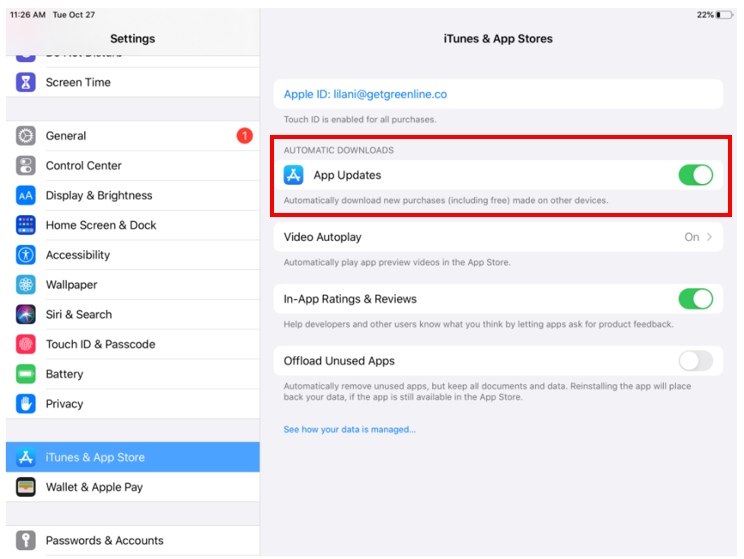
Enable auto updates
Greenline POS is a fast-updating app to ensure that we're always up to Canadian compliant standards follow the steps below. This will ensure that the app updates overnight.
-
Go to your iPad "Settings" app ⚙️
-
Tap on the "iTunes & App Store" section (touch-screen)
-
Ensure you have enabled the "App Updates" toggle
Important steps for ELO Paypoint customers
iOS 12 ships with a default security setting that turns off USB peripherals if the iPad hasn't been unlocked for an hour. This can result in periodic disconnects overnight and in the middle of the day.
We require all ELO Paypoint customers to go through the following steps:
-
Go to your iPad "Settings" app ⚙️
-
Go to "Touch ID & Passcode"
-
Turn on "USB Accessories" (off by default)
-
Restart the iPad
-1-1.png?width=670&height=505&name=image%20(30)-1-1.png)
If you experience any barcode disconnects throughout the day, it can likely be resolved by unplugging the iPad from the dock, then plugging it back in. If for any reason that does not work, an iPad restart will fix all remaining issues.
Enable app diagnostics
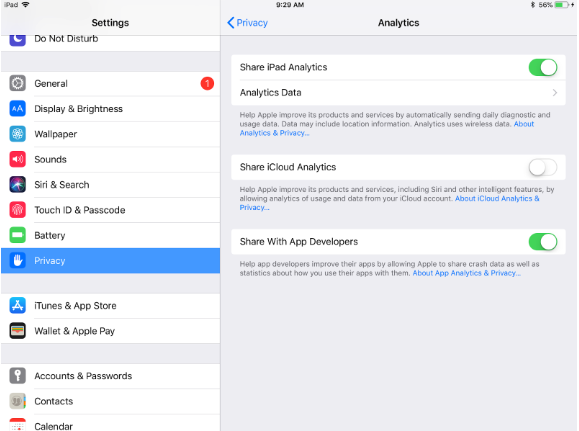
App diagnostics allow for BLAZE’s development team to identify any crashes or app issues you may experience. We take bugs very seriously, so being able to receive data from your iPad in those scenarios are massively helpful for us. You can enable it by going to the “Privacy” settings menu, enabling “Share iPad Analytics”, and “Share with App Developers”.
Download BLAZE RSuite POS
Open the "App Store" application, then search for "BLAZE RSuite" in the search bar.