---
title: Dashboard | Analytics - Customers and Employees
description: Learn how to generate, track, and analyze customer and employee reports in BLAZE to gain actionable insights into shopper trends and staff performance.
---
[Skip to content](https://support.blaze.me/articles/customers#main-content)
[.png?width=140&height=37&name=BLAZE-Logo-Blue%20(2).png)](https://support.blazepos.com/?hsLang=en)
- [BLAZE Apps Knowledge Base](https://support.blazepos.com/)
Open main navigation
Close main navigation
- [BLAZE Apps Knowledge Base](https://support.blazepos.com/)
Questions? Find helpful articles by searching here...
- There are no suggestions because the search field is empty.
1. [R-Suite Knowledge Base](https://support.blaze.me/articles?hsLang=en)
2. [Dashboard](https://support.blaze.me/articles/dashboard?hsLang=en)
3. [Reports](https://support.blaze.me/articles/dashboard?hsLang=en#reports)
# Dashboard | Analytics - Customers and Employees
## Learn about customer and employee reports.
In the report section under the "Analytics" tab, you'll see a breakdown of all the different reports that can be generated in BLAZE POS. This article will explain all the reports within the Customers and Employees sub-sections.
The Customers section provides information about all your customers within the BLAZE system. Users can select multiple locations and date ranges if necessary.
Here you can view the total number of customer profiles in the system and a breakdown of how many new customer profiles have been created within a date range.
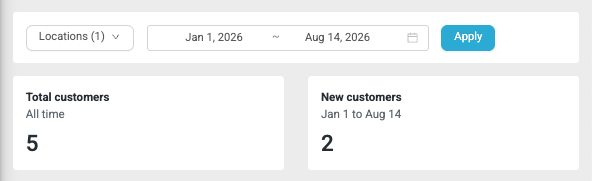
By selecting "View all customers here" you will be provided with a list of the customers and additional information such as how much they have spent. By clicking on the customer's name even more information such as how many visits will be available.
### Employees
#### Employee Sales
The Employee Sales section provides information about all your employees’ sales within the POS system. Users can select multiple locations and date ranges if necessary. Here you can view each employee’s net sales, refunds, discounts, number of sales, and more.
This report may be particularly valuable in viewing your top sales staff. For example, if your store celebrates employee of the month based on net sales generated, you could review this report to identify the top performer.
#### Employee Hours
The Employee Hours section provides information about all your employees’ shift hours within the POS system. Users can select multiple locations and date ranges if necessary.
Shift hours are tracked using the clock in and out features on the POS. Entries can be corrected by editing the start/end times, or by deleting incorrect entries. Breaks are tracked separately from work hours and are considered paid time.
This report may be particularly valuable in viewing your staff’s shift hours. For example, if your store celebrates long-term employees you could review this report to identify the seniority or the total number of service hours.
**Note: BLAZE does not encourage users to use this report as a replacement for payroll purposes.**
- [Getting started](https://support.blaze.me/articles/getting-started?hsLang=en)
- [Dashboard](https://support.blaze.me/articles/dashboard?hsLang=en#main-content)
- [General](https://support.blaze.me/articles/dashboard?hsLang=en#general)
- [Settings](https://support.blaze.me/articles/dashboard?hsLang=en#settings)
- [Employees](https://support.blaze.me/articles/dashboard?hsLang=en#employees)
- [Customers](https://support.blaze.me/articles/dashboard?hsLang=en#customers)
- [Products](https://support.blaze.me/articles/dashboard?hsLang=en#products)
- [Inventory](https://support.blaze.me/articles/dashboard?hsLang=en#inventory)
- [Sales](https://support.blaze.me/articles/dashboard?hsLang=en#sales)
- [Purchase Orders](https://support.blaze.me/articles/dashboard?hsLang=en#purchase-orders)
- [Discounts](https://support.blaze.me/articles/dashboard?hsLang=en#discounts)
- [Reports](https://support.blaze.me/articles/dashboard?hsLang=en#reports)
- [POS (Tablet)](https://support.blaze.me/articles/pos-tablet?hsLang=en#main-content)
- [Getting Started](https://support.blaze.me/articles/pos-tablet?hsLang=en#getting-started)
- [General](https://support.blaze.me/articles/pos-tablet?hsLang=en#general)
- [POS Register](https://support.blaze.me/articles/pos-tablet?hsLang=en#pos-register)
- [Starting and Ending Shifts](https://support.blaze.me/articles/pos-tablet?hsLang=en#starting-and-ending-shifts)
- [POS (Browser)](https://support.blaze.me/articles/pos-browser?hsLang=en#main-content)
- [Starting and Ending Shifts](https://support.blaze.me/articles/pos-browser?hsLang=en#starting-and-ending-shifts)
- [General](https://support.blaze.me/articles/pos-browser?hsLang=en#general)
- [POS Register](https://support.blaze.me/articles/pos-browser?hsLang=en#pos-register)
- [BLAZE ECOM](https://support.blaze.me/articles/blaze-ecom?hsLang=en#main-content)
- [Customization](https://support.blaze.me/articles/blaze-ecom?hsLang=en#customization)
- [ECOM Discounts](https://support.blaze.me/articles/blaze-ecom?hsLang=en#ecom-discounts)
- [SEO](https://support.blaze.me/articles/blaze-ecom?hsLang=en#seo)
- [General](https://support.blaze.me/articles/blaze-ecom?hsLang=en#general)
- [ECOM Set-up](https://support.blaze.me/articles/blaze-ecom?hsLang=en#ecom-set-up)
- [BLAZEPAY](https://support.blaze.me/articles/blazepay?hsLang=en#main-content)
- [Getting Started](https://support.blaze.me/articles/blazepay?hsLang=en#getting-started)
- [General](https://support.blaze.me/articles/blazepay?hsLang=en#general)
- [BLAZEPAY Merchant Portal](https://support.blaze.me/articles/blazepay?hsLang=en#blazepay-merchant-portal)
- [Hardware](https://support.blaze.me/articles/hardware?hsLang=en#main-content)
- [General](https://support.blaze.me/articles/hardware?hsLang=en#general)
- [Printers](https://support.blaze.me/articles/hardware?hsLang=en#printers)
- [Payments](https://support.blaze.me/articles/hardware?hsLang=en#payments)
- [Scanners](https://support.blaze.me/articles/hardware?hsLang=en#scanners)
- [BLAZE Sites](https://support.blaze.me/articles/blaze-sites?hsLang=en#main-content)
- [General](https://support.blaze.me/articles/blaze-sites?hsLang=en#general)
- [Customization](https://support.blaze.me/articles/blaze-sites?hsLang=en#customization)
- [Widgets](https://support.blaze.me/articles/blaze-sites?hsLang=en#widgets)
- [SEO](https://support.blaze.me/articles/blaze-sites?hsLang=en#seo)
[.png?width=140&height=37&name=BLAZE-Logo-Blue%20(2).png "BLAZE-Logo-Blue (2)")](http://blaze.me)
BLAZE Apps Knowledge Base
Copyright © 2026, BLAZE Solutions Inc.