.png?width=140&height=37&name=BLAZE-Logo-Blue%20(2).png)
What do Industry Specific Potencies do?
-
Simplified Setup: No more wading through irrelevant fields. If you sell Liquor, you’ll see ABV; if you sell Vape products, you’ll see Nicotine Strength.
-
Reduced Errors: By removing unnecessary fields, we reduce manual data entry mistakes and save your team time.
-
Support for Multiple Industries: Easily manage a diverse inventory that spans across CBD/Hemp, Vape, Smoke and Liquor sectors within a single interface.
Potency Fields by Industry
When you assign an Industry Type to a category, the following fields become available:
| Industry Type | Available Potency Fields |
| CBD / Hemp | CBD, THC |
| Vape | Nicotine Strength, PG Ratio, VG Ratio |
| Smoke | Nicotine Strength |
| Liquor | ABV, Proof |
How to Set Up Industry Types
Step 1: Assign Industry Type to a Category
-
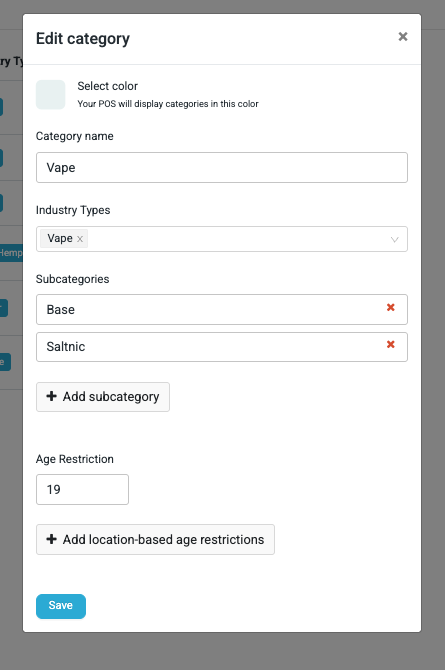
Navigate to Products > Categories.
-
Select Add Category or select an existing category to edit.
-
Locate the Industry Type dropdown. (Note: This is a multi-select field).
-
Select the relevant types (e.g., Liquor, Vape, CBD/Hemp).
-
Save the category. You can now see the Industry Type listed in the main Categories column for quick reference.
Step 2: Add Potency Values to Products
-
Navigate to a product assigned to the category you just edited.
-
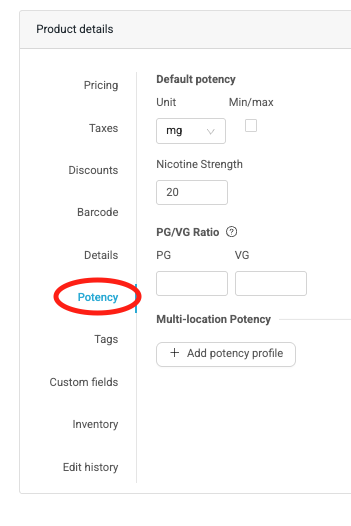
Click on the Potency Tab.
-
The system will now display only the fields corresponding to the Industry Type(s) you selected in Step 1.
-
Note: If no Industry Type is selected for a category, the Potency tab will display a link to help you set one up.
-
POS Functionality (POS Tablet & WebPOS)
We have updated the Point of Sale experience to reflect these new attributes:
-
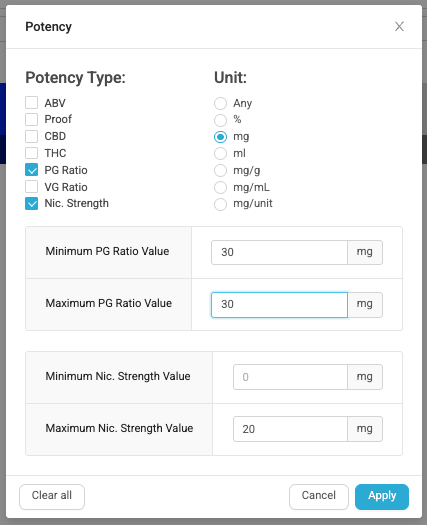
Sorting: You can now sort your inventory by new potency types like ABV, Proof, or Nicotine Strength.
-
Filtering: The Potency Filter has been upgraded to a multi-select checklist. You can filter by one or more types and define specific Min/Max ranges for each.