
Overview
Once Growth is enabled and wallet cards are active, your customers are ready to download them. They can access wallet cards through the Account tab on a mobile device, or you can generate a download link for them. We will explain each option below:
Option 1: Mobile Browser
The most common way customers access your menu is through a mobile browser. You can see our demo showing how they can download the wallet card through their account tab.
Tip: You can copy the URL from the account tab and attach that to a banner
Option 2: Mobile App
Customers can also download your wallet card from the mobile app. They will see the notice when they go to their account tab and check their loyalty points. Watch our demo below.
Option 3: Generate Link Using Growth
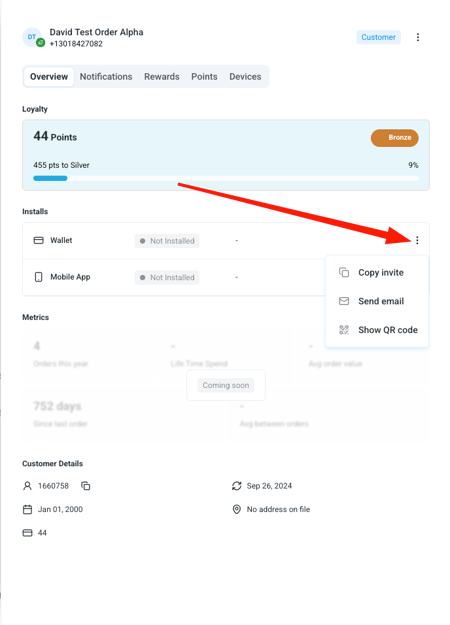
Lastly, you can generate a link for a specific customer using the Growth customers tab. Within Growth, search their customer and click on their profile to open their loyalty summary.
Now you can see if they have the wallet card installed. If not, you can click the 3 dots next to the Wallet card option and review your options. This includes:
- Copying an invite link that you can send to them
- Sending them an email with the link (recommended)
- Showing a QR code they can scan with their phone
Once a customer has their wallet card installed, they can view their card within their phone's wallet app.
We will also stop showing the "add to wallet" callout on their Account tab.