.png?width=140&height=37&name=BLAZE-Logo-Blue%20(2).png)
Navigating to the Customer List
- Log in to the Growth platform.
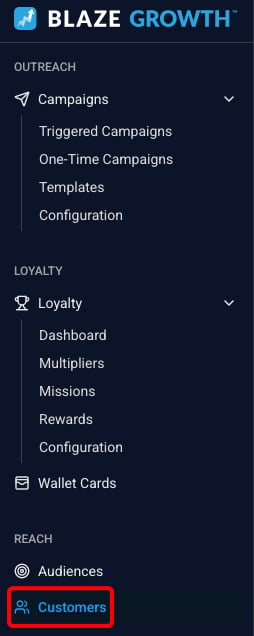
- Go to Customers in the left-hand menu.
You will see a list of all customers associated with your store, along with:
- Their current loyalty tier
- Whether they have a wallet card installed
Click on any customer to open their full profile.

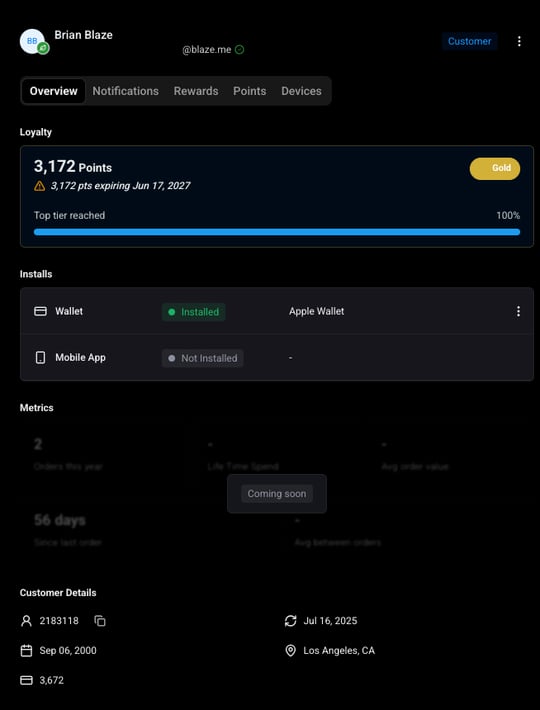
What you can see in a Customer Profile
Loyalty Tier
Displays the customer's current tier based on their accumulated points or visits history.
Available Rewards
A list of the rewards the customer is currently eligible to redeem, based on their current points balance. This is useful for quickly answering the question: "What can this customer redeem right now?"
Points Activity Log
A full history of the customer's points, broken down by event type:
- Accrued - Points earned from a purchase or other qualifying action.
- Consumed - Points spent to redeem a reward.
- Expired - A customer says their points are lower than expected. You check the log and can see that a batch of points expired three days ago because they were earned over a year ago. You can share that context with the customer directly.
Notification History
A complete log of all notifications sent to this customer across all channels, including:
- The channel used (wallet card, email, SMS)
- The date the notification was sent
- The current status of the notification
Use this to confirm whether a customer received a specific campaign, or to investigate a complaint that they did not.
Opt-In Status
Shows which communication channels the customer has opted into. This is helpful when a customer reports not receiving notifications — you can quickly check whether they are opted in to the relevant channel.
Device List
A list of devices registered to this customer. This is the same device list available in your eCommerce platform and is provided for reference and debugging purposes.
Metrics - Coming Soon
Common Loyalty Related Scenarios
"I didn't get the points I expected after my purchase."
Open the customer's profile, go to the Points Activity Log, and check for a recent Accrued event. If no event appears, the order may not have synced yet or may not have qualified under the current point rate. Escalate to your account team if the issue persists.
"My points disappeared."
Check the Points Activity Log for expired events around the time the customer noticed the change. Points expire based on the expiration window set in your loyalty configuration (default: 365 days from when they were earned).
"I never got the notification from your campaign."
Check the Notification History for that customer. Confirm the notification was sent and review the status. Also check their Opt-In Status to verify they are opted in to the channel used.
"I thought I had enough points for a reward but I can't redeem it."
Check the Available Rewards section to see exactly which rewards the customer currently qualifies for based on their live points balance.