.png?width=140&height=37&name=BLAZE-Logo-Blue%20(2).png)
-
Why would you override a category?
You may need to override a category if a specific product within a broader BLAZE category requires a different reporting classification or unit of measure in Metrc than the rest of the items.
Examples of Overriding a Metrc Category:
| Scenario | BLAZE Category (Default Metrc Mapping) | Product Level Override (New Metrc Category) |
| Unit vs. Weight | "Concentrates" mapped to Concentrate (Weight) | A 1g Vape Cart overridden to Concentrate (Each) |
| Potency Variations | "Edibles" mapped to Edible (Weight) | A high-dose tincture overridden to Tincture (Volume) |
Prerequisites
Before you can map a specific category to a product, you must ensure your system is properly synced and the product is set up correctly:
- App: BLAZE Web Dashboard
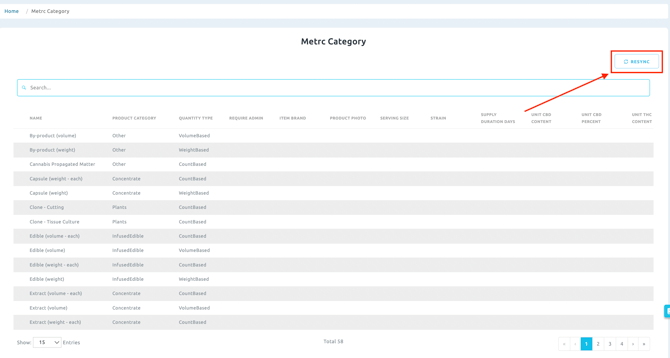
- Requirement: Initial Sync. To ensure your Metrc Categories are populated and available to select from the dropdown menu, you must first perform a sync. Navigate to Compliance > Metrc Category and click Resync.
NOTE: Before you can associate an individual product with a unique Metrc category override, the product must already be created and associated with a parent BLAZE category that has a default Metrc category assigned to it.
-
How to Add a Metrc Category in the Product Profile
Once your Metrc categories are synced, follow these steps to apply an override to a specific product:
- Navigate to Inventory > All and select an existing product to view its product profile.
- Click the Edit Product button in the upper right corner.
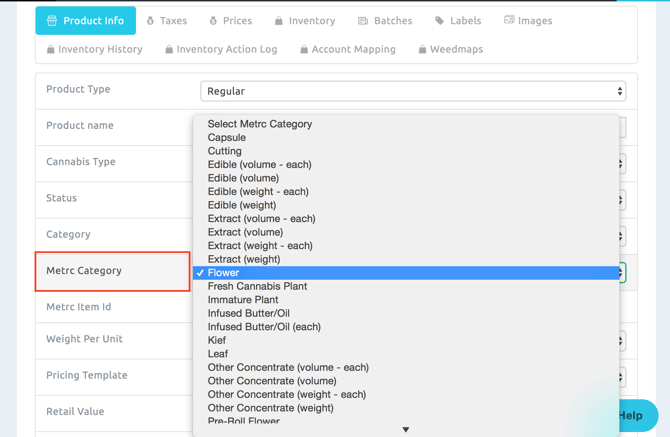
- Locate the Metrc Category section.
- Click the dropdown menu to view all available Metrc categories and make your new selection.
- If any changes are made, be sure to click Save to lock in the new Metrc category for this specific product.