.png?width=140&height=37&name=BLAZE-Logo-Blue%20(2).png)
Prerequisites
-
Access to Company Inventory > Company Products.
-
A clear understanding of your current Security Role and Shop Assignments.
How the Logic Works
The system identifies a user as having "All Shops" status if any of the following conditions are met:
-
The Add All Shops toggle is enabled on your user profile.
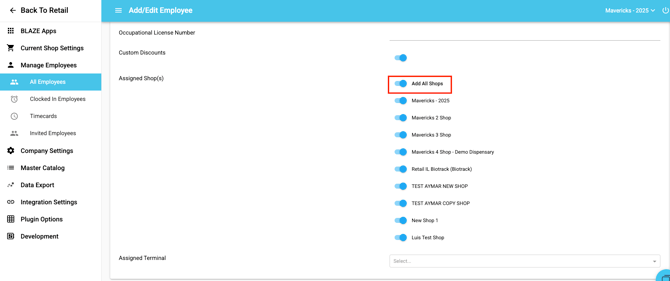
-
Your manually assigned shop list matches the total count of active shops in the company.
-
Your specific security role/permission flag explicitly grants global administrative access.
Restrictions for Non-"All Shops" Users
If you have access to some shops but not all, the Company Products module becomes a view-only resource. While you can still view the product list and details (provided you have "View Products" permissions), the following actions are disabled:
-
Global Management: Add, Edit, Delete, or Duplicate Company Products.
-
Bulk Actions: Access to Bulk Edit and CSV Imports.
-
Categorization: Toggling "Active" status or changing global Categories/Brands.
-
Media: Image uploads directly on the product detail page.
Visual Cues
-
Tooltips: Hovering over a disabled button (such as Add Product) will display: "Editing Company Products requires All Shops permission."
-
Modified Buttons: The Import/Export button will transform into an Export only button.
Permitted Actions for Local Managers
Even without "All Shops" access, local managers can still perform essential day-to-day tasks:
-
Export Data: You can still export CSV/Excel files for reporting purposes (requires "Export" permission).
-
Shop Overrides: If you have "Shop Edit" rights for your assigned locations, you can still edit shop-specific fields. These changes are saved as Overrides and only affect the shops you are explicitly assigned to manage.
-
Vendors & Brands: Access to these sections remains tied to standard "View/Manage vendors in web" permissions rather than the All Shops requirement.