.png?width=140&height=37&name=BLAZE-Logo-Blue%20(2).png)
Member Export Access
The Member Export feature is configured at the individual employee level within the employee profile. Only Super Admins have the ability to modify this permission setting.
Super Admin Access
If Super Admin access is needed, please contact support@blaze.me to request enablement.
Please note: Written consent from the contract holder is required before an employee can be granted Super Admin privileges.
How to Enable Member Export
-
Confirm with your Super Admin that the appropriate permission settings are enabled within the employee profile.
- Navigate to the employee profile and enable the Export Members permission.

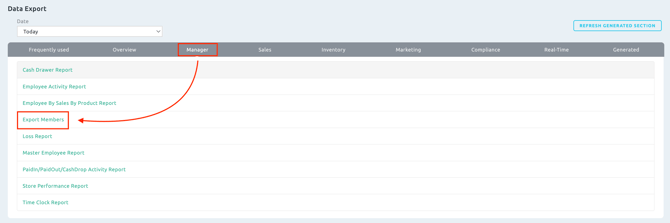
3. Once enabled, the Member Export option will be available under:
Data Exports > Managers > Export Members